
Badges
Badges are a fun, colorful way to reward progress and encourage engagement for participants of all fitness levels and interests. From breaking a daily step record to uploading a photo, participants earn badges on their own time and display their achievements on their profile.
How Badges Work
Participants can earn badges across three categories:
Activity Badges are awarded for meeting activity and step targets. For example, hitting 50,000 steps, meeting a daily step goal, or entering steps for a 7-day streak.
Social Badges are awarded for completing social activities such as uploading a photo or adding a journal entry. These are a good way to encourage participants to share updates and connect with friends.
Wellness Badges are awarded for consistently logging wellness metrics.
Once a participant earns a badge, it appears on their profile.
Getting Started with Badges
To manage your badge settings, go to your Admin Panel, select the Features tab, then open the Badge Settings panel.
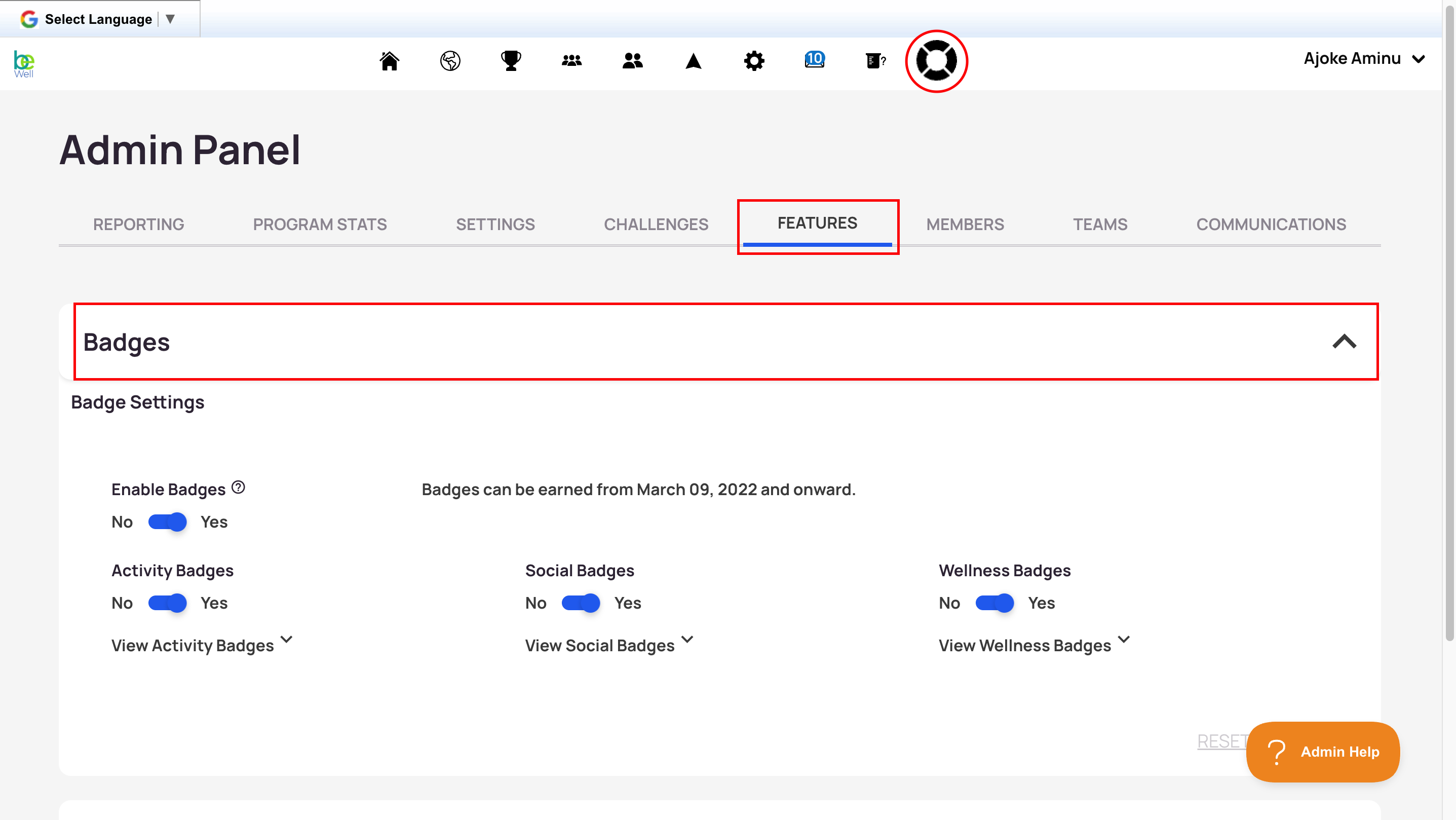
From Badge Settings you can:
Turn badges on or off for your program. Turning badges off removes the ability to earn badges for all participants and hides their badge collection page. If you turn badges back on, any badges a participant previously earned reappear.
Turn individual badge categories on or off. If you switch off a category, participants can no longer earn badges for those activities.