
What is Be Well?
What is Be Well?
Be Well is Terryberry's employee wellness platform that helps organizations build healthier, more connected workplaces. Members track physical activity, take part in wellness challenges, and engage with their colleagues around shared goals—all from the web or the Be Well mobile app.
Be Well turns everyday healthy habits into an ongoing, social experience. Members log steps and activities, join individual and team challenges, follow friends, and monitor their progress over time, while administrators design programs, launch challenges, and track engagement across the organization.
What Be Well offers
Be Well brings together the core elements of a workplace wellness program:
Activity tracking lets members record steps and wellness activities manually or by syncing a device or app. Challenges, individual, team, and wellness-based, give members a shared goal to work toward and a way to stay motivated. Social features such as the activity feed, friends, and team pages keep members connected and engaged. Recognition of progress through badges and milestones celebrates consistency and achievement along the way.
The specific features available to you depend on how your organization has configured its program. Not every program uses every feature, and some options are managed by program administrators.
How members access Be Well
Be Well is available on the web and through the Be Well mobile app for iOS and Android. Members can track activity, join challenges, and engage with their team from either, with the mobile app adding on-the-go logging and device syncing. Throughout this documentation, features are noted as participant-facing or administrator-facing so you can quickly find what applies to your role.
How Be Well Works at a Glance
Be Well is your personal hub for tracking activity, joining challenges, and building healthier daily habits. Everything you need sits on the Home screen, with dedicated areas for challenges, tracking, community, and learning accessible from the bottom navigation.
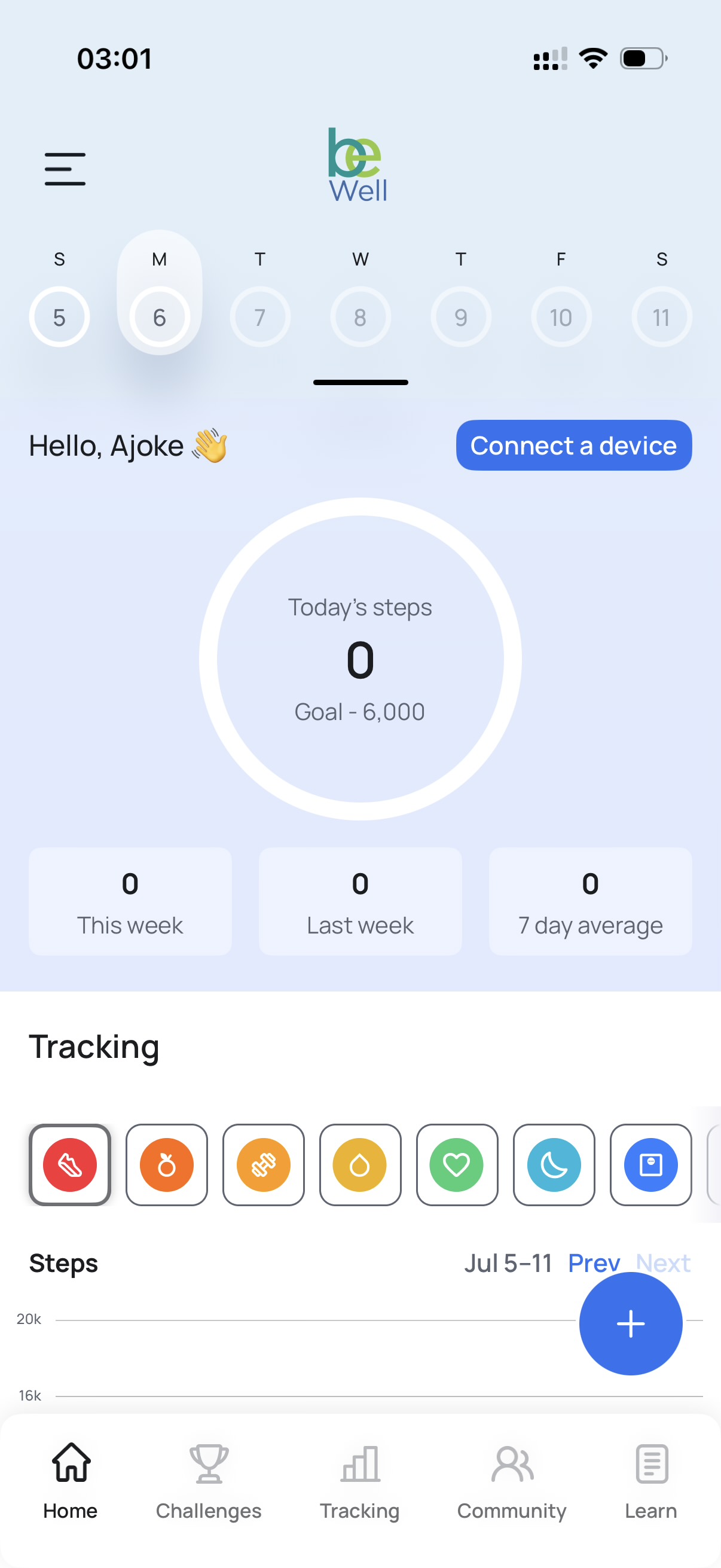
Your daily snapshot
The top of the Home screen shows your progress for the current day. The date selector lets you move across the week, and the central step counter displays your steps against your daily goal. Below it, three summary cards—This Week, Last Week, and 7 Day Average—give you a quick read on your recent activity trends.
Connecting a device
Selecting Connect a Device links a wearable or health app to Be Well so your activity syncs automatically. If you'd rather log activity yourself, you can also enter it manually.
Tracking your activity
The Tracking section lets you record more than just steps. Each icon represents a category you can log: steps, nutrition, exercise, hydration, heart health, sleep, and more. Select a category to view your data for the week and use the add button to make a new entry.
Moving around the app
The bottom navigation bar is your primary way to move through Be Well:
- Home — your daily activity snapshot and tracking overview
- Challenges — join and monitor individual and team challenges
- Tracking — a fuller view of your logged activity over time
- Community — connect with colleagues and share progress
- Learn — wellness resources and educational content
The menu in the top-left corner gives you access to your profile and account settings.