
Manager Dashboard
You can access it from the LHS of the Recognition Wall by selecting View Dashboard under Team Dashboard. This view highlights how your team is doing compared to the company average.
Click here for an interactive tour you can share with your managers: https://terryberry.navattic.com/kb-manager-dashboards
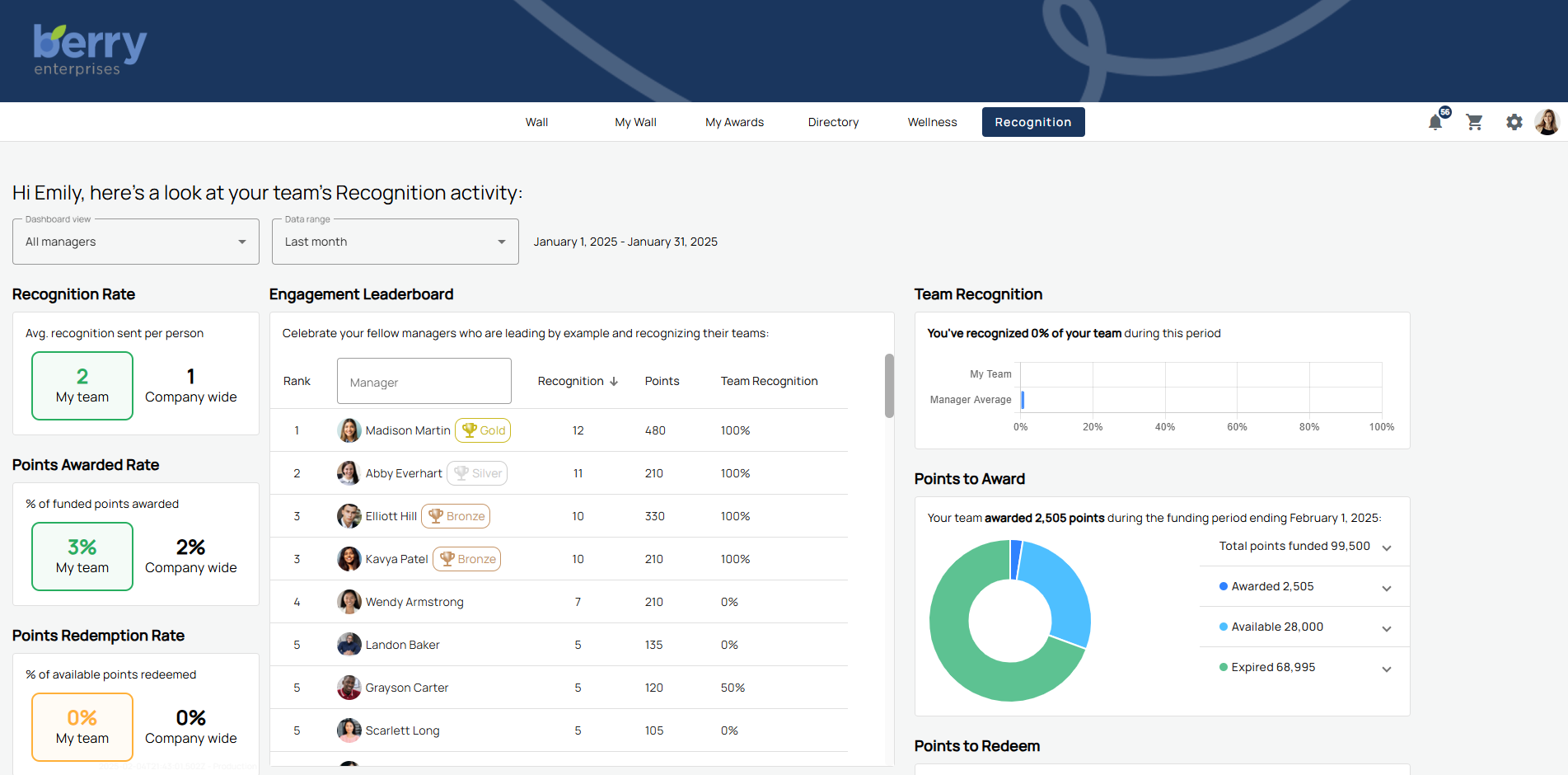
Color coding helps you understand results quickly.
- Green = above company average.
- Yellow = matches company average.
- Red = below company average.
Metrics shown include:
- Recognition Rate – average recognition sent per person.
- Points Awarded Rate – percentage of funded points awarded.
- Points Redemption Rate – percentage of available points redeemed.
- Login Rate – average logins per person.
You can adjust the date range to the current month, quarter, or year to date. This helps you spot changes in recognition behavior over time.
Recognition Reminders
Recognition Reminders show you who hasn’t been recognized recently. You’ll see the last recognition date, type, and days since recognition. Check a box beside a name to send recognition, give points, or create an eCard directly. This helps you keep recognition consistent and timely.
Team Recognition & Leaderboard
The Team Recognition chart breaks down recognition activity across your team. You’ll see how many events were sent, who received recognition, and how activity compares across employees.
The Engagement Leaderboard ranks team members by recognition or points received/sent. Toggle between views to see who’s most engaged and who may need more encouragement.
Points to Award & Redeem
The dashboard shows both:
- Points to Award – your team’s funded points, awarded points, available balance, and any expired points.
- Points to Redeem – a list of team members and their available balances.
This helps you monitor point funding and redemption so recognition remains active.
Upcoming Birthdays & Milestones
You’ll also see upcoming birthdays and service anniversaries specific to your team. From here, you can quickly send a birthday eCard or sign a service anniversary card, keeping celebrations personal and timely.
Direct Reports
This view shows recognition and engagement activity only for the employees who report directly to you. Use this when you want a focused view of your immediate team’s participation.
Indirect Reports
This view rolls up data for everyone under your reporting chain, including employees managed by your direct reports. If you’re a department head or senior manager, this view helps you see recognition trends across the broader organization.
Combined View (my direct and indirect reports)
You can also select a combined view of both direct and indirect reports. This allows you to measure how recognition flows across your entire area of responsibility.
All Managers
This view benchmarks your recognition activity against other managers in the company. Program admins can enable this to motivate managers and highlight strong recognition practices. You can see how much of your team you’ve recognized, compare averages, and review points awarded.
- For example, you might see that you’ve recognized 89% of your team year to date, while the manager average is only 12%.
- You may also see rankings, such as being in the top 7% of managers for points awarded.